Clean Architecture in Flutter: Building Scalable Applications with Riverpod
Learn how Clean Architecture helps Flutter developers build scalable, maintainable, and testable applications. Explore Data, Domain, and Presentation layers with a practical Riverpod-based example.
Every Flutter project starts clean.
You create a few screens, add some API calls, introduce Riverpod or Bloc, and everything feels manageable. The login screen talks to the API. The profile screen loads user data. The home screen displays products. Life is good.
Then the project grows.
A new feature arrives. Another API gets added. Business rules become more complicated. Suddenly your screens contain hundreds of lines of code. API calls are scattered across widgets. State management becomes difficult to follow. Testing feels impossible.
The application still works, but nobody enjoys working on it anymore.
The problem is not Flutter.
The problem is architecture.
This is exactly the problem that Clean Architecture was designed to solve.
The Real Problem: Everything Knows About Everything
Many Flutter applications start with a structure like this:
lib/
├── screens/
├── widgets/
├── services/
└── models/
A login screen might directly call an API:
class LoginScreen extends ConsumerWidget {

  Future<void> login() async {

    final response = await dio.post(
      '/login',
      data: {
        'email': email,
        'password': password,
      },
    );

    // update state
    // navigate user
    // handle errors
  }
}
At first this feels convenient.
The problem appears later.
The UI now knows:
- How the API works
- Which HTTP client is used
- What the response looks like
- How authentication works
The screen has become responsible for everything.
If the API changes, the UI changes.
If the database changes, the UI changes.
If authentication changes, the UI changes.
A simple screen slowly becomes the most fragile part of the application.
This is called tight coupling.
The Goal: Separate Responsibilities
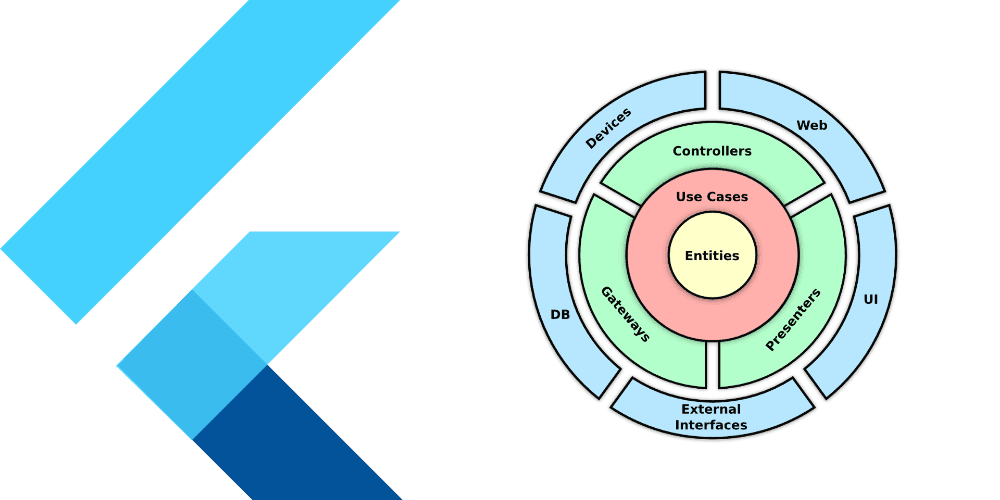
Clean Architecture follows a simple principle:
Every layer should have one responsibility and should not know more than it needs to.
Instead of putting everything inside the UI, we separate the application into layers.
Feature
├── data
│   ├── models
│   ├── repositories
│   └── datasources
│
├── domain
│   ├── entities
│   ├── repositories
│   └── usecases
│
└── presentation
    ├── screens
    ├── widgets
    └── providers
Each layer has a specific responsibility.
Nothing more.
Nothing less.
The Domain Layer: The Heart of the Application
The Domain Layer contains the business rules.
Not Flutter.
Not Firebase.
Not APIs.
Just business logic.
Imagine we're building an authentication system.
The domain layer might contain a User entity:
class User {
  final String id;
  final String name;

  User({
    required this.id,
    required this.name,
  });
}
This object doesn't know about JSON.
It doesn't know about Firebase.
It doesn't know about Flutter.
It simply represents a user.
The domain layer also defines contracts.
abstract class AuthRepository {
  Future<User> login(
    String email,
    String password,
  );
}
Notice something important.
This repository doesn't explain how login happens.
It simply declares that login is possible.
That distinction is what makes Clean Architecture powerful.
Use Cases: Business Actions
Most applications have actions.
- Login User
- Register User
- Create Order
- Add Product
- Roll Dice
- Move Pawn
These actions belong inside Use Cases.
class LoginUseCase {

  final AuthRepository repository;

  LoginUseCase(this.repository);

  Future<User> call(
    String email,
    String password,
  ) {
    return repository.login(
      email,
      password,
    );
  }
}
A use case represents a business action.
Nothing more.
It doesn't care whether data comes from Firebase, REST APIs, SQLite, or GraphQL.
Its only concern is executing business rules.
The Data Layer: Talking to the Outside World
The Domain Layer defines what should happen.
The Data Layer defines how it happens.
This layer communicates with:
- REST APIs
- Firebase
- Supabase
- SQLite
- Hive
- Shared Preferences
Suppose our backend returns JSON.
The Data Layer converts that JSON into application objects.
class UserModel extends User {

  UserModel({
    required super.id,
    required super.name,
  });

  factory UserModel.fromJson(
    Map<String, dynamic> json,
  ) {
    return UserModel(
      id: json['id'],
      name: json['name'],
    );
  }
}
Unlike entities, models understand external data formats.
That's why they belong in the Data Layer.
The Presentation Layer: What Users Actually See
The Presentation Layer is responsible for the user experience.
It contains:
- Screens
- Widgets
- State Management
- Navigation
In modern Flutter applications, Riverpod Notifiers often act as ViewModels.
class AuthNotifier
    extends AsyncNotifier<User?> {

  @override
  Future<User?> build() async {
    return null;
  }

  Future<void> login(
    String email,
    String password,
  ) async {

    final useCase =
        ref.read(loginUseCaseProvider);

    state = const AsyncLoading();

    state = await AsyncValue.guard(
      () => useCase(
        email,
        password,
      ),
    );
  }
}
The UI does not call APIs.
The UI does not contain business logic.
The UI simply talks to the ViewModel and displays state.
The Complete Flow
User Clicks Login
        │
        ▼
LoginScreen
        │
        ▼
AuthNotifier
        │
        ▼
LoginUseCase
        │
        ▼
AuthRepository
        │
        ▼
AuthRepositoryImpl
        │
        ▼
AuthRemoteDataSource
        │
        ▼
REST API
Each layer has one responsibility.
Each layer knows only what it needs to know.
This separation makes the application easier to understand, easier to test, and easier to maintain.
Why Clean Architecture Matters
Clean Architecture isn't about creating more folders.
It's about creating boundaries.
When business logic, data access, and UI are separated, your application becomes significantly easier to scale.
Features can evolve independently. APIs can change without breaking screens. New developers can understand the codebase faster. Testing becomes straightforward.
Most importantly, the application remains maintainable long after the first version is shipped.
Final Thought
Frameworks change. State management libraries change. Backend technologies change.
Good architecture survives all of them.
Clean Architecture helps Flutter developers build applications that remain scalable, testable, and maintainable as complexity grows.
Start small. Separate responsibilities. Let each layer do one thing well.
Your future self—and your teammates—will thank you for it.