MVVM Explained: Separating UI, State, and Business Logic in Flutter
Learn how the MVVM (Model-View-ViewModel) architecture pattern helps Flutter developers build scalable, maintainable, and testable applications. Discover the roles of Models, Views, and ViewModels, and see how Riverpod and Bloc fit naturally into modern MVVM implementations.
MVVM Explained: Separating UI, State, and Business Logic in Flutter
Every application has three fundamental responsibilities.
It needs to display data. It needs to manage state. And it needs to interact with data sources such as APIs, databases, or local storage.
When an application is small, developers often place all three responsibilities inside a single screen.
The UI fetches data. The UI manages state. The UI handles business logic.
Everything works.
Until it doesn't.
As features grow, screens become larger, state becomes harder to track, and testing becomes increasingly difficult. A simple login screen can quickly turn into hundreds of lines of code containing API calls, validation logic, state management, navigation, and UI rendering.
This is exactly the problem that Model-View-ViewModel (MVVM) was designed to solve.
The Core Idea Behind MVVM
MVVM stands for:
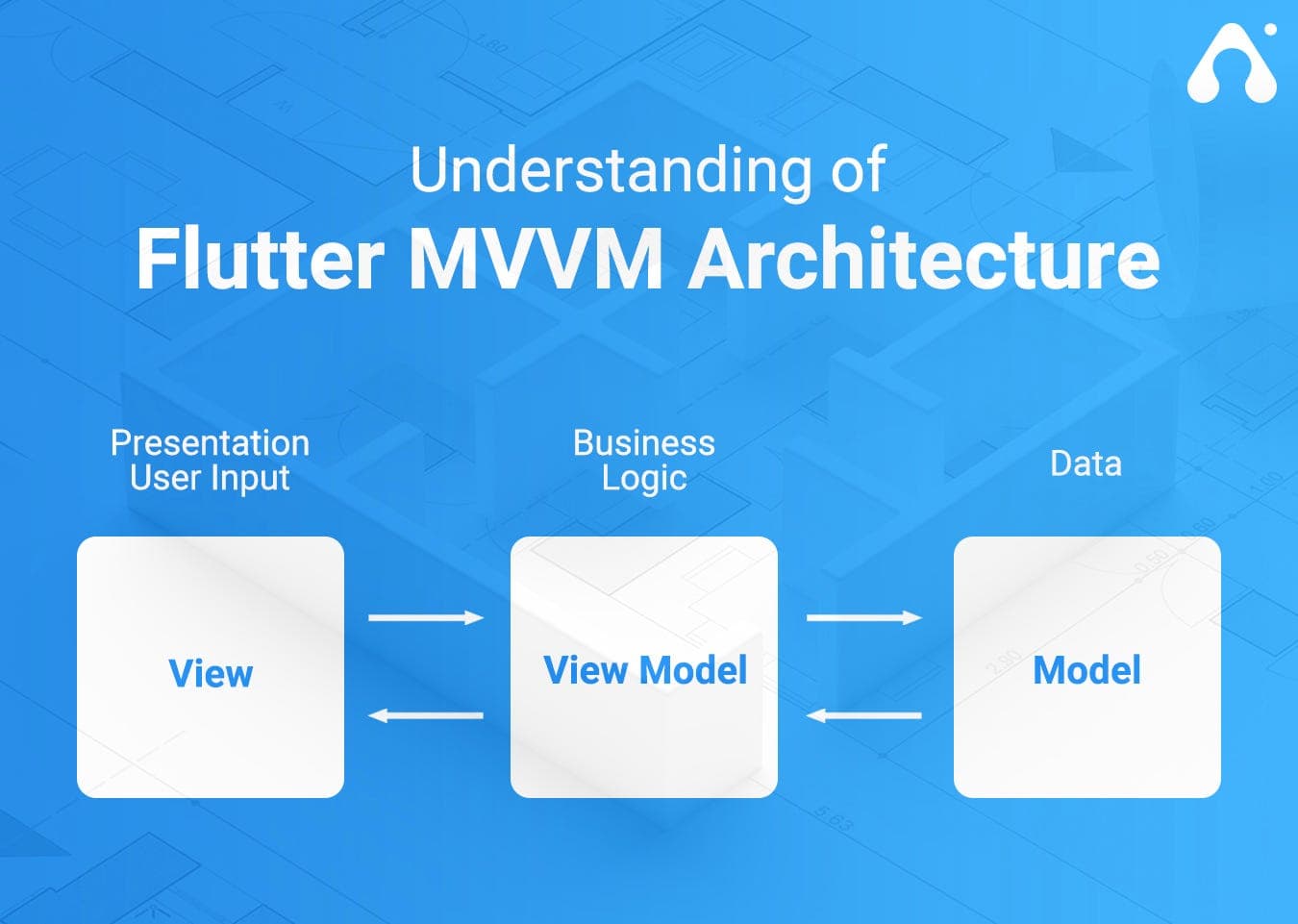
Model View ViewModel The goal is simple.
Instead of letting the UI do everything, responsibilities are divided into separate layers.
View ↓ ViewModel ↓ Model Each layer has one clear responsibility.
The View displays information.
The ViewModel manages state and presentation logic.
The Model provides and stores data.
This separation creates applications that are easier to understand, maintain, and test.
The Problem Before MVVM
1Consider a login screen that directly talks to an API.
class LoginScreen extends StatefulWidget { @override
State createState() => _LoginScreenState(); }
class _LoginScreenState extends State {
bool isLoading = false;
Future login() async {
setState(() {
isLoading = true;
});
final response = await dio.post(
'/login',
data: {
'email': email,
'password': password,
},
);
setState(() {
isLoading = false;
});
} }
This approach works, but the screen is responsible for far too many things.
- Rendering UI
- Managing loading state
- Handling errors
- Making API requests
- Processing responses
The screen has become the center of the entire application.
As complexity grows, maintenance becomes painful.
The View
The View is what users see.
Its only responsibility is displaying information and forwarding user actions.
A View should never contain complex business logic.
2It should never directly communicate with databases or APIs.
Its job is presentation.
class LoginScreen extends ConsumerWidget {
@override Widget build( BuildContext context, WidgetRef ref, ) {
final state =
ref.watch(authProvider);
return Scaffold(
body: Center(
child: ElevatedButton(
onPressed: () {
ref
.read(
authProvider.notifier,
)
.login(
email,
password,
);
},
child: const Text(
'Login',
),
),
),
);
} }
The View simply displays state and forwards user interactions.
The Model
The Model represents data.
It may contain:
- Entities
- Repositories
- Services
- Data Sources
The Model knows how to retrieve data.
3It knows how to communicate with APIs, databases, Firebase, or local storage.
class User { final String id; final String name;
User({ required this.id, required this.name, }); }
A repository might look like this:
class AuthRepository {
Future login( String email, String password, ) async {
final response = await dio.post(
'/login',
data: {
'email': email,
'password': password,
},
);
return User(
id: response.data['id'],
name: response.data['name'],
);
} }
The Model does not know about widgets.
The Model does not know about screens.
It only manages data.
The ViewModel
The ViewModel is the bridge between the View and the Model.
This is where many developers become confused.
The ViewModel is not simply state management.
It manages state, but it also coordinates business logic and communication between layers.
The ViewModel receives requests from the View, talks to the Model, and exposes state back to the View.
4class AuthNotifier extends AsyncNotifier {
final AuthRepository repository;
AuthNotifier(this.repository);
Future login( String email, String password, ) async {
state = const AsyncLoading();
state = await AsyncValue.guard(
() => repository.login(
email,
password,
),
);
} } This ViewModel handles:
- Loading states
- Error states
- User actions
- Communication with repositories
The UI no longer needs to know how authentication works.
MVVM with Riverpod
In Flutter, Riverpod is commonly used to implement the ViewModel layer.
Model ↓ Repository ↓ Riverpod Notifier ↓ Screen In this setup:
- Repository = Model
- Notifier = ViewModel
- Screen = View
Riverpod itself is not MVVM.
Riverpod is simply a tool that helps implement the ViewModel.
MVVM with Bloc
The same architecture can be implemented using Bloc.
5Model ↓ Repository ↓ Bloc ↓ Screen In this case:
- Repository = Model
- Bloc = ViewModel
- Screen = View
MVVM remains the architecture.
Bloc is simply the technology used to implement the ViewModel layer.
A Typical Flutter MVVM Structure
lib/ └── features/ └── auth/ ├── models/ ├── repositories/
├── viewmodels/ └── views/
Or when using Riverpod:
lib/ └── features/ └── auth/ ├── models/ ├── repositories/
├── providers/ └── screens/
Many Flutter teams use providers as ViewModels, making this structure a practical implementation of MVVM.
The Complete Flow
User Clicks Login │ ▼ LoginScreen (View) │ ▼ AuthNotifier
(ViewModel) │ ▼ AuthRepository (Model) │ ▼ REST API │ ▼ Response │ ▼ AuthNotifier │ ▼
LoginScreen
The View never talks directly to the API.
The Model never talks directly to widgets.
The ViewModel coordinates everything in between.
Why MVVM Matters
The biggest benefit of MVVM is separation of concerns.
Each layer focuses on a single responsibility.
This makes applications:
- Easier to maintain
- Easier to test
- Easier to scale
- Easier for teams to work on
As applications grow, the benefits become increasingly noticeable.
Final Thought
MVVM is not a state management library.
MVVM is not a Flutter package.
MVVM is an architectural pattern that separates UI, state management, and data access into independent layers.
Whether you use Riverpod, Bloc, Provider, GetX, or another solution, the underlying principle remains the same.
Keep the View focused on UI.
Keep the Model focused on data.
Keep the ViewModel focused on state and coordination.
Do that consistently, and your Flutter applications will remain manageable long after the first version is shipped.