Demystifying ROOM Models and DAOs: An Architecture Guide for Local-First Flutter Apps
Many mobile developers treat local databases as an afterthought. From a Computer Engineer’s perspective, mastering local relational architectures, specifically ROOM models, DAOs, and offline synchronization, is what separates a simple interface from a scalable, production-ready system. Here is how to implement these patterns natively in Flutter

Every developer eventually finds a technology that changes the way they think about building software.
For some developers, it's React.
For others, it's Django, Spring Boot, .NET, or Node.js.
For me, that technology was Flutter.
When I first started exploring application development, I was exposed to the traditional approach of building separate applications for different platforms.
Android required one technology stack.
iOS required another.
Web applications had their own ecosystem.
Desktop applications often required entirely different tools.
The amount of duplicated effort felt unnecessary.
Then I discovered Flutter.
At first, I viewed it simply as a cross-platform framework.
Over time, I realized it was much more than that.
Flutter fundamentally changed how I approach software development.
More Than Cross-Platform Development
The feature most people associate with Flutter is cross-platform development.
And rightfully so.
Flutter allows developers to build applications for Android, iOS, Web, Windows, macOS, and Linux from a single codebase.
That alone is impressive.
But what attracted me wasn't simply writing code once.
It was maintaining code once.
As projects grow, maintenance becomes significantly more expensive than development.
Fixing bugs, implementing new features, updating business logic, and supporting multiple platforms can quickly become overwhelming.
Flutter dramatically reduces that burden.
The Problem with Scattered Queries
As applications grow, database architecture becomes increasingly important.
I enjoy building software that is maintainable, scalable, and easy to understand.
Many developers think adding local storage means writing raw SQL commands right inside their UI widgets or state controllers.
That approach breaks down rapidly.
When database queries are scattered across your features, changing a single column name means searching through dozens of separate files.
It pollutes your business logic.
It causes unneeded structural failures.
To build real systems instead of simple interfaces, we must look at how native frameworks solve this using the ROOM pattern.
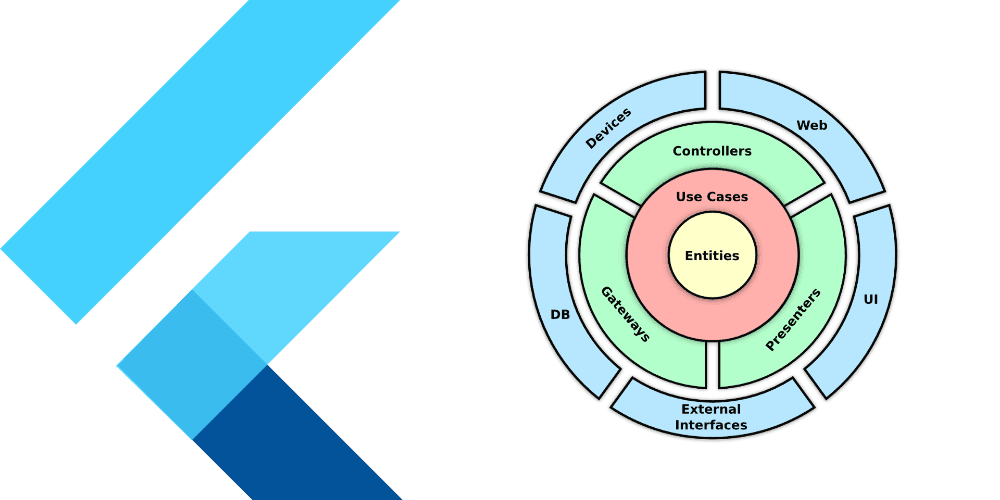
Structuring a local-first application around ROOM Models and Data Access Objects (DAOs) fixes this exact vulnerability.
Step 1: ROOM Models (The Entities)
In software engineering, a Model or Entity represents the structural blueprint of your data.
In a local database system, a ROOM model maps a standard runtime object class directly to a single relational database table.
Instead of allowing loose maps or unvalidated JSON payloads to float around your codebase, you enforce a strict layout.
Whether it is tracking transaction streams or caching news feeds, a true model defines explicit columns, types, and primary keys.
It cleanly isolates how data looks from how it is queried.
Step 2: DAOs (The Gatekeepers)
One of the greatest architectural patterns you can adopt in mobile engineering is the Data Access Object (DAO).
A DAO is a dedicated class or interface that completely isolates all database interaction logic from the rest of the application.
The UI shouldn't care how a database runs.
The UI should only care that data is available.
Instead of scattering database code everywhere, you create a gatekeeper.
All operations—such as insertions, reads, updates, and deletions—live in this layer.
This layout creates an exceptional developer experience.
If a local database schema changes or requires optimization, you modify the code exactly once inside your DAO layer.
Your state management, user interface, and business rules remain completely untouched.
Mapping It to Flutter Code
As a Flutter developer, you don't use the native Android Room library directly.
Instead, you implement these exact architectural concepts using raw SQLite (sqflite) helpers or packages like Floor and Drift.
A professional, singleton-based database helper handling multiple entities and safe migrations looks like this:
import 'package:sqflite/sqflite.dart';
import 'package:path/path.dart';

class DatabaseHelper {
  static final DatabaseHelper _instance = DatabaseHelper._internal();
  static Database? _database;

  DatabaseHelper._internal();
  factory DatabaseHelper() => _instance;

  Future<Database> get database async {
    if (_database != null) return _database!;
    _database = await _initDatabase();
    return _database!;
  }

  Future<Database> _initDatabase() async {
    final dbPath = await getDatabasesPath();
    final path = join(dbPath, 'app_production.db');

    return await openDatabase(
      path,
      version: 2,
      onCreate: (db, version) async {
        await db.execute('''
          CREATE TABLE transactions (
            id INTEGER PRIMARY KEY AUTOINCREMENT,
            title TEXT,
            amount TEXT,
            updated_at INTEGER
          )
        ''');
      },
      onUpgrade: (db, oldVersion, newVersion) async {
        if (oldVersion < 2) {
          await db.execute('ALTER TABLE transactions ADD COLUMN updated_at INTEGER');
        }
      },
    );
  }

  Future<int> insertTransaction(Map<String, dynamic> transaction) async {
    final db = await database;
    if (!transaction.containsKey('updated_at')) {
      transaction['updated_at'] = DateTime.now().millisecondsSinceEpoch;
    }
    return await db.insert(
      'transactions',
      transaction,
      conflictAlgorithm: ConflictAlgorithm.replace,
    );
  }

  Future<List<Map<String, dynamic>>> fetchTransactions() async {
    final db = await database;
    return await db.query('transactions', orderBy: 'updated_at DESC');
  }
}
The Ultimate Goal: Seamless Offline Sync
For me, organizing local data cleanly isn't just about offline availability.
It's about creating a foundational layer for remote server synchronization.
When syncing offline apps with servers, time is your ultimate reference point.
By tracking an updated_at epoch timestamp inside your local entities and utilizing intelligent conflict resolution algorithms—like ConflictAlgorithm.replace during insertion—you build a highly stable data stream.
The app caches user modifications instantly on the local device, tracks exactly when the change occurred, and pushes the payload gracefully to the server once network connectivity is restored.
Final Thoughts
Flutter feels like real software engineering when you look past the UI widgets and focus on systemic data patterns.
Whether you are building complex financial ledger tools, local news engines, or interactive offline systems, organizing your local architecture around strict data models and clean DAO interfaces is a game-changer.
It keeps your project scalable, testable, and robust.
Don't just build interfaces. Build systems.